Which Klaviyo flows should you set up first?
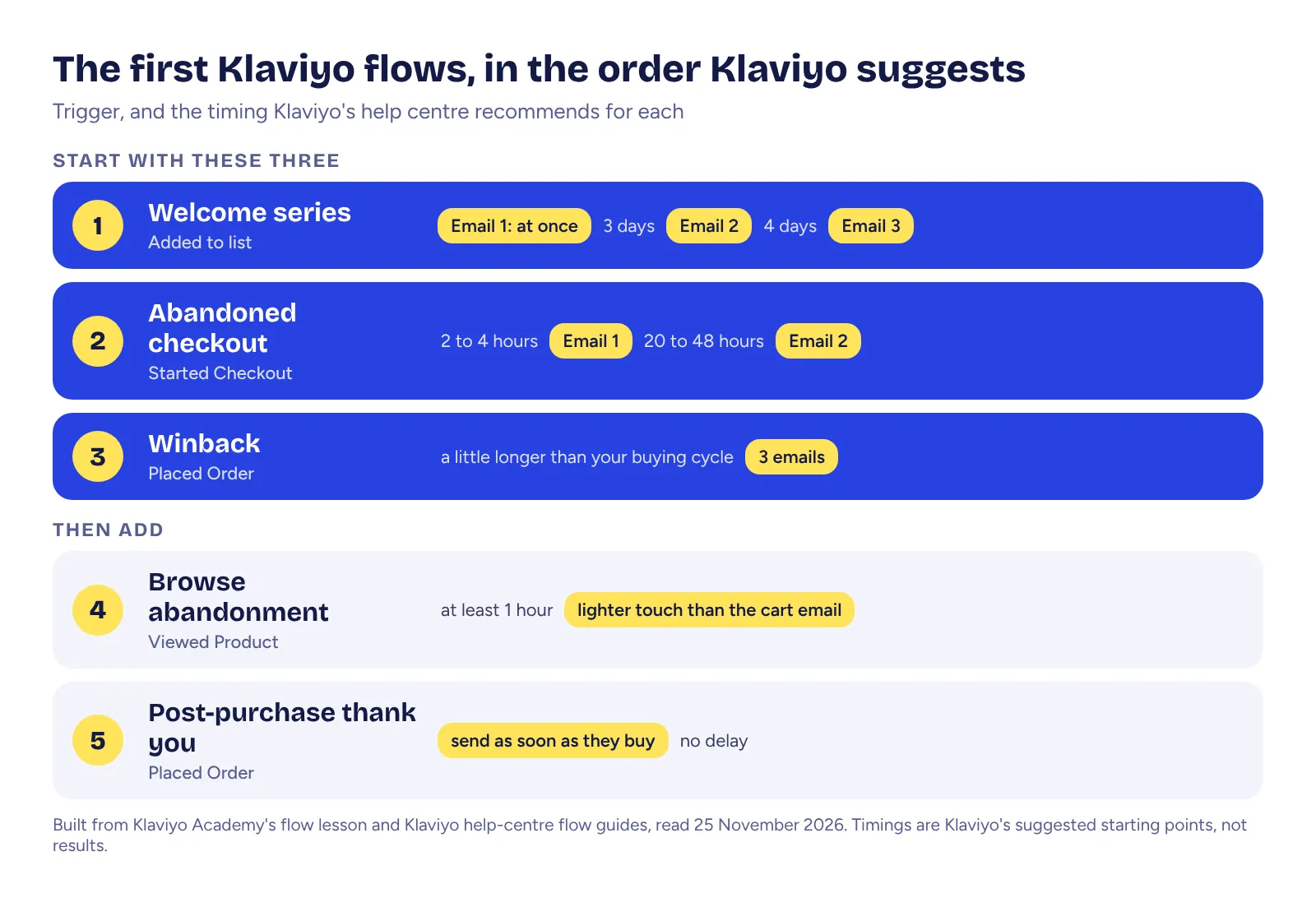
Three, in this order: a welcome series, an abandoned checkout flow and a winback flow. That is the list Klaviyo’s own Academy gives under “set up these 3 flows” in its lesson on flows. The same lesson names two more key flows, browse abandonment and a thank-you email after the first purchase, which are the natural next pair.
A flow is an automated email (or text) sequence that starts when a shopper does something: subscribes, starts checkout, buys, or goes quiet. Once built, it runs without you. For a store that pays for traffic, flows are what follows up with the visitors the ads already paid for.
Everything below was read on Klaviyo’s pricing page, its Academy and its help-centre flow guides on 25 November 2026. Klaviyo changes its pages and products; its own pages win over this report.
Are flows included on the free plan?
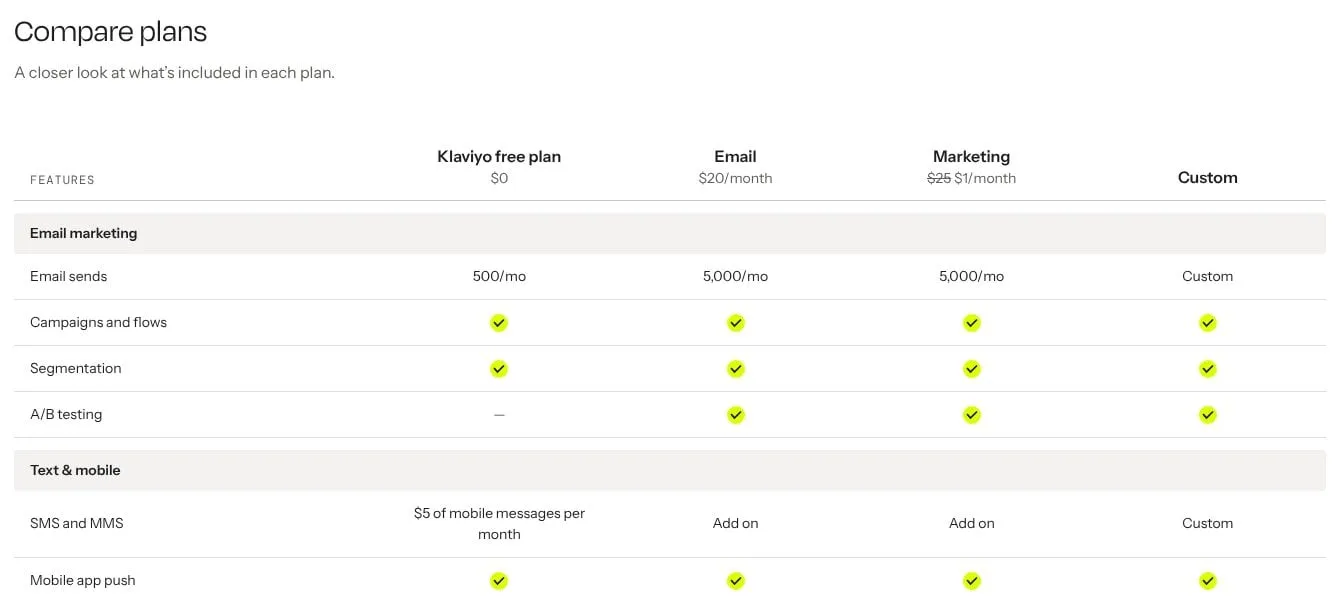
Yes. Klaviyo’s plan comparison ticks “Campaigns and flows” on all four plans, the free plan included. What changes between plans is how many emails you can send each month, and every email a flow sends counts toward that number, the same as a campaign.
| Plan | Price | Active profiles | Email sends a month | Flows | A/B testing |
|---|---|---|---|---|---|
| Free | $0 | Up to 250 | 500 | Yes | No |
| $20 a month | 500 | 5,000 | Yes | Yes | |
| Marketing | $25 a month (first month $1 on an offer for up to 5,000 profiles) | 500 | 5,000 | Yes | Yes |
| Custom | Talk to sales | Over 150,000 | Custom | Yes | Yes |
Two lines in that comparison matter for flows. The free plan has no A/B testing, so you cannot test two versions of a welcome email against each other until you pay. And texts are separate: the free plan includes $5 of mobile messages a month, and SMS is an add-on on the paid plans, so an SMS step in a flow is billed on top. Klaviyo SMS pricing explains how.
For what Klaviyo costs as the list grows past 500 profiles, see Klaviyo pricing explained, or price your own list against Shopify Email with the email cost calculator.
1. Welcome series: what triggers it and how many emails?
It triggers when someone is added to your list: through a Klaviyo sign-up form, a subscribe page, the API, or a manual add. Klaviyo puts a pre-built “Welcome Series” in every new account, and its help-centre guide recommends three emails over about a week:
- Email 1, at once. Introduce the brand and collect preferences.
- Email 2, 3 days later. The guide suggests pointing to your social accounts.
- Email 3, 4 days after that. Show best-sellers.
Three set-up details from the same guide catch new stores out:
- Point every form at the same list. Shopify’s footer newsletter form is not a Klaviyo form, but it can still add contacts to a Klaviyo list. Check in the integration settings that it adds them to the list your welcome series watches.
- Klaviyo lists are double opt-in by default. The subscriber confirms first, then enters the welcome series. Klaviyo recommends keeping that on for the main list.
- Set the flow to manual before importing a list. If you import while it is live, everyone imported is scheduled for the first email, even people who subscribed months ago.
Keep the email and SMS welcome flows separate. Klaviyo’s note is that people may sign up for each at different times, and someone can enter a list-triggered flow only once.
2. Abandoned checkout: how soon should the first email go?
Klaviyo’s pre-built abandoned cart flows mostly trigger on Started Checkout, which fires once a shopper has entered contact details and moved to the next checkout step. Some integrations also track Added to Cart, which catches people earlier. According to Klaviyo’s abandoned cart guide:
- First email 2 to 4 hours after checkout starts, second email 20 to 48 hours later. The pre-built flow waits 4 hours.
- Add the filter “Placed Order zero times since starting this flow.” Without it, people who bought get reminded to buy. Klaviyo checks the filter before every email, so a buyer drops out after the first one. A large number of people “skipped” in the flow report is the filter doing its job.
- Do not set very short delays. Integrations other than Shopify and BigCommerce may sync checkout data only once an hour; if you need a short delay, Klaviyo suggests at least 1 hour 15 minutes.
- Run only one cart flow per shopper. If you build both an Added to Cart and a Started Checkout flow, add “Started Checkout zero times since starting this flow” to the Added to Cart one.
If you are on Shopify, Klaviyo’s guide also notes that you may already have Shopify’s own abandoned checkout email switched on. Decide which tool sends it, and turn the other off.
3. Winback: when should it start?
A winback flow triggers on Placed Order and waits. The delay is the decision: Klaviyo’s winback guide says to set it a little longer than your store’s average time between orders, so you only email people who are genuinely late. A shampoo brand and a sofa brand need very different delays.
To find your buying cycle, the guide suggests a segment of customers with at least 2 orders in the last 2 years, exported to a spreadsheet, with the “Average Time Between Orders” column averaged. Then:
- Keep it to three emails. A short first email with three to six best-sellers or new releases; a second that repeats any offer with a deadline; a third that is the last call and makes unsubscribing easy.
- Add “Placed Order zero times since starting this flow”, so anyone who buys stops getting winback emails.
- Take replenishable products out. Klaviyo suggests a separate replenishment flow for items with a set reorder cycle.
4 and 5. Browse abandonment and the thank-you email
Once the first three are live, Klaviyo’s Academy lesson lists two more key flows.
Browse abandonment triggers on Viewed Product, when someone looks at a product page and leaves without adding to cart. Klaviyo’s guide calls it a “lighter touchpoint” than the cart email, recommends a delay of at least an hour, and suggests a filter so nobody gets it more than once in 30 days. Two practical limits: it needs Klaviyo’s Viewed Product tracking, which on Shopify comes from Klaviyo’s app embed; and on Shopify, Klaviyo may not track visitors in the EU, EEA, UK and Switzerland who have not given consent, so those visitors never enter the flow.
The thank-you email is part of what Klaviyo calls post-purchase flows, which also include cross-sell, upsell and review requests. The post-purchase guide triggers them on Placed Order, recommends no delay before a thank-you, and suggests splitting first-time and repeat buyers. Leave a gap before any review or cross-sell email, and check it does not land on the same day as your order and shipping notices.
A worked example: does a small store fit on the free plan?
Illustrative only. The plan limits are Klaviyo’s, read 25 November 2026. The store’s numbers are made up to show the arithmetic.
A new store has 240 subscribed profiles, under the free plan’s 250. In a typical month:
| Source | Count | Emails each | Sends |
|---|---|---|---|
| Welcome series | 60 new subscribers | 3 | 180 |
| Abandoned checkout | 50 checkouts that did not finish (buyers drop out) | up to 2 | 100 at most |
| Winback | 20 lapsed customers | 3 | 60 |
| Flows total | 340 | ||
| One newsletter to the whole list | 240 profiles | 1 | 240 |
| Month total | 580 |
The flows alone fit inside the free plan’s 500 sends. One newsletter on top takes the month to 580 and over the limit. At that point the store needs the Email plan, $20 a month for 500 profiles and 5,000 sends, which also brings A/B testing for the flows. The flows themselves cost nothing extra on either plan; the sends they generate do.
Who this order suits, and who should change it
| Store | Start with | Why |
|---|---|---|
| New store buying traffic, list under 1,000 | Welcome, then abandoned checkout | Most of the list is new, and paid visitors who start checkout are the easiest sales to recover |
| Store with repeat products (food, beauty, supplements) | Abandoned checkout, then replenishment instead of a generic winback | A reorder reminder timed to the product beats a “we miss you” email |
| Store selling one-off big-ticket items | Welcome and abandoned checkout, longer delays | Klaviyo’s guide notes considered purchases may need longer waits; winback matters less if people rarely reorder |
| Store selling mostly into the EU or UK | Same order, but expect a smaller browse abandonment flow | Viewed Product is not tracked for visitors who have not consented |
| Skip Klaviyo for now | — | You send one newsletter a month and no flows; Shopify’s own email may cover you. Klaviyo vs Shopify Email sets out when to switch |
Before you switch the flows on
- Turn on Klaviyo’s tracking first. Abandoned checkout and browse abandonment both depend on your store’s events reaching Klaviyo.
- Pick one list for every sign-up form, and point the welcome series at it.
- Add the Placed Order filter to every flow that should stop when someone buys.
- Decide who sends the abandoned checkout email, Shopify or Klaviyo, never both.
- Count the sends. Flows plus campaigns must fit the plan’s monthly email limit.
This report is part of Email and SMS for Shopify stores, which sets out which tool to use, what each costs, and when to switch.
Over the counter
Which Klaviyo flow should I set up first?
The welcome series. Klaviyo's Academy lists it first of the three flows to set up, ahead of abandoned cart and winback, and Klaviyo offers a pre-built welcome series in every new account. It sends three emails over about a week: one at once, one after 3 days and one 4 days later.
Are Klaviyo flows free?
Flows are included on every Klaviyo plan, including the free plan, according to Klaviyo's pricing page read on 25 November 2026. The emails they send are not unlimited: they count toward the plan's monthly email sends, which are 500 on the free plan and 5,000 on the $20 Email plan at 500 active profiles.
How long should the delay be in a Klaviyo abandoned cart flow?
Klaviyo's help centre recommends sending the first abandoned cart email 2 to 4 hours after someone starts checkout, and a second 20 to 48 hours later. Its pre-built flow waits 4 hours. It advises against very short delays because some integrations sync checkout data only once an hour.
What is the difference between abandoned cart and browse abandonment in Klaviyo?
Klaviyo's abandoned cart flow triggers on Started Checkout or Added to Cart, so the shopper chose an item. Browse abandonment triggers on Viewed Product, when someone only looked at a product page. Klaviyo recommends making browse abandonment emails a lighter touch than abandoned cart ones.
Do I need Shopify's abandoned checkout email if I use Klaviyo?
Klaviyo's help centre notes that Shopify stores may already have abandoned cart emails switched on in Shopify, and says Klaviyo's version allows more customisation. If you build the flow in Klaviyo, check Shopify's setting too, so a shopper does not get the reminder from both.
What we read, and when
Checked November 25, 2026. These pages change without notice, so the source wins over anything here.
- Klaviyo pricing
- Klaviyo Academy: enhance your marketing strategy with flows
- Klaviyo help: how to create an email welcome series
- Klaviyo help: how to create an abandoned cart flow
- Klaviyo help: how to create a winback flow
- Klaviyo help: how to create a browse abandonment flow
- Klaviyo help: how to create a post-purchase flow